Introduction
Have you ever wondered how dozens of microphones, instruments, and effects can all work together on one stage—without chaos? At the center of it all is the audio mixer. It takes in signals from multiple sources and turns them into a single, polished output that sounds seamless to the audience. For audio engineers, system integrators, and technical buyers, understanding how an audio mixer works isn’t just helpful—it’s essential. It improves system design, reduces setup time, and ensures consistent sound quality in any environment.
In this article, we’ll break down how an audio mixer functions from the inside out—exploring inputs, processing, routing, and output—so you can apply this knowledge confidently in live shows, studios, or commercial AV setups.
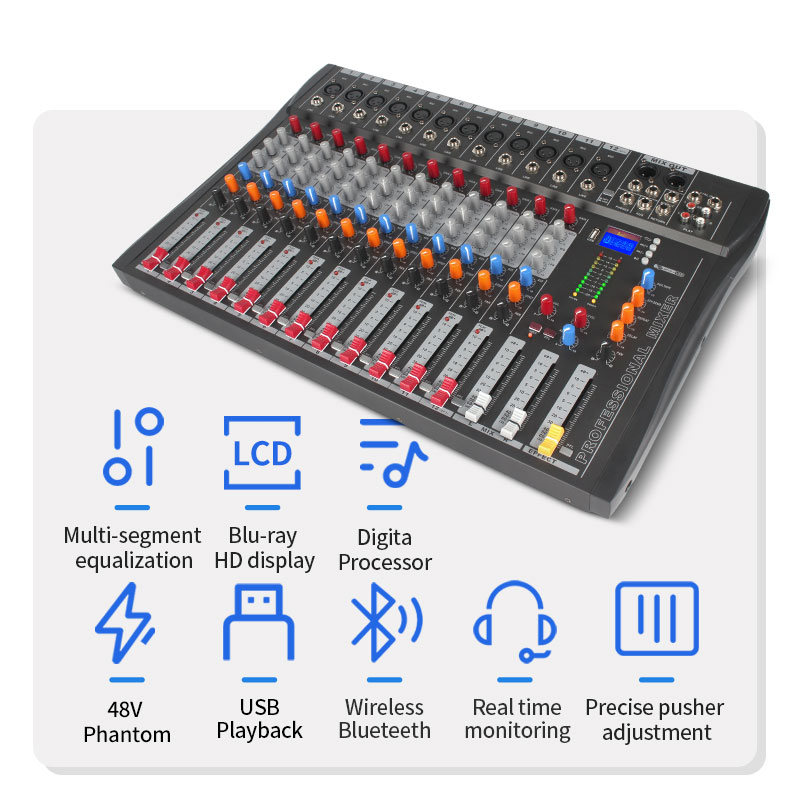
Understanding the Core Function of an Audio Mixer
What Is an Audio Mixer Used For?
At its simplest, an audio mixer combines multiple sound sources into one unified signal. But in practice, it does much more:
● Balances volume between sources
● Shapes tone using EQ
● Positions sounds in stereo space
● Routes audio to monitors and effects
● Sends the final mix to speakers or recorders
It acts as both a control center and processing hub.
How Audio Signals Flow: Input → Processing → Output
Every audio mixer follows the same basic signal journey:
1. Input stage – Microphones or instruments enter through XLR or line ports
2. Preamp and gain – Weak signals are boosted to usable levels
3. Channel processing – EQ, pan, and aux sends shape each source
4. Mix buses – Signals combine into main or subgroup outputs
5. Master output – Final audio feeds amplifiers, speakers, or recording devices
Once you understand this flow, most mixers feel familiar—even across different brands.
The Goal: Creating a Balanced, Unified Mix
A good mix lets every voice and instrument sit clearly in the sound field. No element dominates. No detail disappears.
This balance depends on:
● Proper gain staging
● Thoughtful EQ
● Controlled dynamics
● Clean routing
Common Applications
Audio mixers support several environments. Each uses the same principles but different workflows.
Application Area | Typical Purpose |
Live Sound | Control vocals, instruments, and stage monitors |
Studio Recording | Capture multitrack audio for editing |
Broadcast | Mix dialogue, music, and effects in real time |
Commercial AV | Manage microphones and playback for meetings |
They allow operators to shape every source before audiences hear it.
Inside the Channel Strip: Where the Mixing Happens
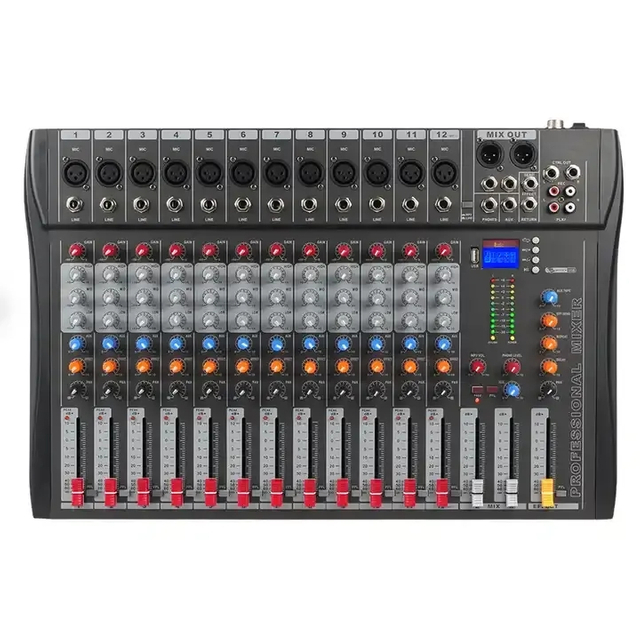
Each input on an audio mixer runs through a dedicated channel strip. This vertical path lets engineers shape, route, and control sound before it's blended into the final mix. While mixers may look complex, each channel follows a consistent structure. Once you understand what each section does, mixing becomes intuitive—even on large-format consoles.
Below is a breakdown of the main components found in most channel strips and how they affect sound:
Component | Function | Details |
Gain / Trim | Sets the input signal level after the preamp | Too low causes noise; too high leads to distortion. Always set this first. |
EQ | Adjusts tone by shaping frequency ranges | - Low: warmth and bass - Mid: clarity and presence - High: detail and brightness |
PAN | Positions sound within the stereo field | Moves mono signals left or right to create space in the mix |
AUX Sends | Routes audio to monitors or external effects | Sends signal to in-ear systems, stage monitors, or effects like reverb |
Channel Fader | Controls the output level of the channel in the main mix | Think of it as the final volume control after processing |
By mastering these channel strip elements, even entry-level users can quickly understand how to shape clear, balanced audio.
Analog vs. Digital Audio Mixers: How Processing Works
Analog Mixers
Analog mixers handle audio through physical circuits, keeping the signal in its original electrical form from input to output. Their design is familiar and tactile, which is why many engineers still prefer them—especially for straightforward setups. With no layers of software or screens to navigate, analog mixers offer a direct, hands-on experience that many find intuitive and responsive.
They typically offer:
● Direct tactile control for real-time adjustment
● Minimal menus or screens to navigate
● Straightforward routing that’s easy to trace and troubleshoot
Digital Mixers
Digital mixers take a more modern approach by converting analog signals into digital data. This data is processed using internal DSP (digital signal processing), enabling deeper control, automation, and feature sets. After processing, signals are converted back to analog for output.
Their advantages include:
● Scene memory for recalling complete mixer setups
● Built-in EQ, compression, and effects processing
● Remote control options via tablet, PC, or smartphone
● Compact designs that save space and reduce gear clutter
Here’s a minimalist visual comparison:
Feature | Analog Mixer | Digital Mixer |
Signal Path | Electrical | Digital (via DSP) |
Interface | Hands-on | Screen + Remote |
Sound | Natural / Warm | Clean / Configurable |
Features | Basic EQ, PAN | EQ, FX, Scenes, Recall |
Control | Physical knobs | PC, tablet, app |
Many professional venues choose Lihui digital mixers because they combine onboard DSP, intuitive interfaces, and scene recall. They suit touring rigs and permanent installs.
Inputs and Outputs: Understanding Audio Pathways
Common Input Types: Mic, Line, Instrument
Audio mixers are designed to accept different types of input signals, each requiring a specific input port and level. Choosing the right input type ensures clean gain staging and avoids signal distortion or loss.
● Mic inputs (XLR) – These are designed for microphones, which produce low-level signals that need preamplification. They're balanced and shielded to reduce noise during transmission.
● Line inputs (TRS/RCA) – Used for devices like keyboards, mixers, or playback systems. Line-level signals are stronger than mic signals and don’t require as much gain.
● Instrument inputs – Intended for guitars, basses, or other high-impedance sources. These inputs often pass through a DI (direct input) stage before mixing.
Each input type handles a different signal strength, so matching the source to the correct input is essential for optimal audio performance.
Common Output Paths
Once audio signals are mixed and processed, they need clear paths to reach speakers, monitors, or recording systems. Most audio mixers provide several standard output options, each serving a specific role in live sound, studio work, or AV installations.
Below is a simple overview of the most common output paths:
Output Type | Purpose |
Main L/R | Audience sound |
Subgroups | Grouped processing |
AUX Outputs | Monitor mixes |
USB | Computer recording |
Balanced connections help reject interference over long cable runs, which makes them especially suitable for commercial and professional installations.
Signal Routing in Practice: Behind the Scenes
Main Bus and Subgroup Logic
Individual channels feed the main bus for audience sound. Subgroups collect related channels—such as drums or vocals—so engineers can apply shared EQ or compression. This approach saves time and keeps large mixes organized.
Effects Loops, Inserts, and Send/Return Paths
Inserts place processors like compressors directly into a channel’s signal path. Sends route audio to external or internal effects, then return it back into the mix. This setup allows creative processing without changing the original signal balance.
Routing Options in Digital Interfaces
Digital mixers often include virtual routing matrices that let users freely assign inputs, buses, and outputs. This added flexibility supports everything from multi-zone audio to remote stage feeds, all without physical rewiring. It's ideal for dynamic setups and changing venue needs.
Monitoring Mixes and Signal Splitting
Performers receive tailored monitor mixes via aux sends, completely separate from the audience mix. This separation improves stage clarity and prevents unwanted sound shifts, ensuring comfort for musicians and consistency for listeners.
Monitoring and Feedback Control
Creating Monitor Mixes for Performers
Musicians need personalized mixes to perform confidently. Aux sends make this possible by delivering separate mixes to each performer's monitor or in-ear system. Each musician can hear more of what they need—like their own vocals or instruments—while minimizing distractions.
Using Solo and Mute Without Affecting Main Output
Solo lets engineers isolate and listen to one channel through headphones without affecting the audience mix. Mute instantly removes a channel from the main mix but doesn’t alter other routing paths, making it useful for quick sound checks or managing technical issues mid-show.
Managing Headphone and Speaker Outputs
Audio mixers offer dedicated headphone and control room outputs that allow engineers to preview channels privately. This separation is crucial for identifying problems or adjusting levels during a performance—without disturbing the main mix the audience hears.
Built‑in Effects and DSP Processing
Modern digital audio mixers include internal processing. They provide reverb, delay, compression, and gating without external hardware.
Common Built‑In Effects
Modern digital audio mixers often include built-in effects processing, reducing the need for external gear. These effects enhance sound quality and allow engineers to tailor the mix for different environments or musical styles. Effects are typically routed through AUX or FX buses, enabling selective application per channel. Presets can be saved and recalled instantly—ideal for live shows with limited setup time.
Here’s a quick overview of commonly used built-in effects and their roles:
Effect | Purpose |
Reverb | Adds space |
Delay | Creates depth |
Compression | Controls dynamics |
EQ | Shapes tone |
Brands like Lihui offer mixers with integrated DSP and preset recall features, helping fast-paced venues reduce setup time while maintaining sound consistency.
Understanding Mixer Specifications
What “16×4×2” Means: Inputs, Subgroups, Outputs
Mixer model numbers often describe basic routing capacity. A format like “16×4×2” usually represents the number of input channels, available subgroups, and main outputs. This quick reference helps buyers understand how many sources they can connect and how flexibly they can route audio for processing or monitoring.
● Input channels determine how many microphones or devices the mixer accepts
● Subgroups allow grouped control of related channels
● Main outputs send the final mix to speakers or recording systems
Difference Between Total Channels and Preamps
Some mixers advertise many inputs but provide fewer microphone preamps. Line inputs don’t include preamps, so they require already amplified signals. Always verify preamp count to ensure the mixer supports your microphone needs, especially for live or multi-mic setups.
Desktop vs. Rackmount Models
Audio mixers come in different form factors to suit various environments. The two most common types are desktop and rackmount models. Choosing the right one depends on how and where the mixer will be used.
Below is a simple comparison to highlight the key differences:
Model Type | Best For |
Desktop Mixer | Studio setups and fixed desks |
Rackmount Mixer | Mobile rigs or compact installs |
Desktop mixers provide easier hands-on access, while rackmount units save space and integrate well with touring or AV racks.
Choosing the Right Audio Mixer for Your Application
Matching Mixer Features to Operational Needs
Different environments demand different mixer features. Live venues often prioritize flexible monitor outputs, quick adjustments, and fast scene recall. Studios focus more on multitrack recording, high-fidelity preamps, and seamless DAW integration. Meanwhile, conference systems and corporate AV setups require reliability, ease of use, and minimal downtime.
Studio vs. Live vs. Broadcast Considerations
Every application brings different technical priorities. Here's a comparison of key requirements:
Application | Key Features |
Live Sound | Aux sends, scene recall |
Studio | USB recording, clean preamps |
Broadcast | Routing flexibility, redundancy |
Long-Term Maintenance, Firmware, and Support
Look for brands that provide regular firmware updates and reliable customer support. Long-term performance and system stability depend not just on hardware, but on service access and ongoing compatibility.
Certifications and Reliability for International Use
With ISO, CE, FCC, and RoHS certifications, Lihui mixers meet international standards. They’re suitable for multi-site deployments, offering consistent quality, strong DSP performance, and reliable technical support—especially important for B2B projects in global markets.
Conclusion
An audio mixer turns separate sounds into one clean output. Each channel shapes tone and volume through gain, EQ, and routing. Understanding this flow gives users better sound and system control. For professionals, choosing the right mixer means matching features to their needs. Dongguan Lihui Technology Co., Ltd. delivers smart, DSP-powered mixers that support live, studio, and AV systems with precision and ease.
FAQ
Q: What does an audio mixer do?
A: An audio mixer takes multiple sound sources and blends them into a single, balanced output with controlled volume, tone, and effects.
Q: How does an audio mixer work internally?
A: An audio mixer works by guiding signals through gain controls, EQ, pan, and routing paths, then combining them into buses and final outputs.
Q: Why should I understand how an audio mixer works?
A: Understanding how an audio mixer works improves your ability to manage sound quality, troubleshoot issues, and operate systems efficiently.
Q: What's the difference between analog and digital audio mixers?
A: Analog mixers use physical circuits, while digital mixers process signals with internal DSP, allowing for preset recall and remote control.
Q: Can I use an audio mixer for both live and studio setups?
A: Yes, most audio mixers are versatile enough for live events, recording, and broadcast setups when configured properly.
Q: What makes Lihui audio mixers reliable for professionals?
A: Dongguan Lihui Technology Co., Ltd. offers mixers with built-in DSP, strong routing options, and global certifications—ideal for demanding AV systems.


 +86-18822957988
  rick@lihuitech.com
  +86-13925512558
  Hengbang Technology Park Lihui Technology Co., Ltd., No. 8 Weiheng Road, Niushan Industrial Zone, Dongguan City