Introduction
Have you ever tried managing multiple sound sources—like mics, instruments, or background tracks—and ended up with a messy mix? It happens fast. That’s why professionals and creators alike depend on one powerful tool: the audio mixer. An audio mixer takes all your audio inputs and blends them into one clean, balanced output. It adjusts volume, tone, and effects for each source. Whether you're hosting a live concert, producing a podcast, or streaming gameplay, a mixer gives you total control over how it sounds.
In this article, you'll learn what an audio mixer is, how it works, and why it’s essential for clear and professional-grade sound. We’ll walk through mixer types, key features, and help you choose the right one for your setup.
What Does an Audio Mixer Do?
Real-time Mixing and Signal Control
Mixers give you instant control over every connected source. Each sound channel—like a mic or keyboard—feeds into its own strip. You can adjust the volume, tone, and effects on the fly using physical faders, knobs, or digital screens. This level of control is essential when handling live events or recording multiple speakers or instruments at once.
Balance and Shape the Sound
Mixers balance sound sources so one doesn’t overpower the other. Through equalization (EQ), they let you enhance or reduce frequencies—boosting low-end punch or softening harsh vocals. Applying effects like delay, compression, or reverb helps refine your final output. For example, turning a flat guitar tone into a layered, studio-grade signal takes only seconds on a mixer.
Routing Audio to Different Destinations
An audio mixer can split audio paths. You might send one mix to main speakers, another to stage monitors, and yet another to a recorder. This separation allows for customized monitoring setups while keeping the audience feed untouched. It's also how live performers hear a different mix than the crowd does.
Function | Description | Example Use Case |
Volume Control | Set loudness of each input channel | Balance between vocals and guitar |
EQ & Effects | Shape tone and apply sound enhancements | Add reverb to vocals |
Audio Routing | Send different mixes to speakers, monitors, recorders | Performers hear monitors only |
Note: For hybrid events, use routing to separate online and on-site audio without overlap or feedback.
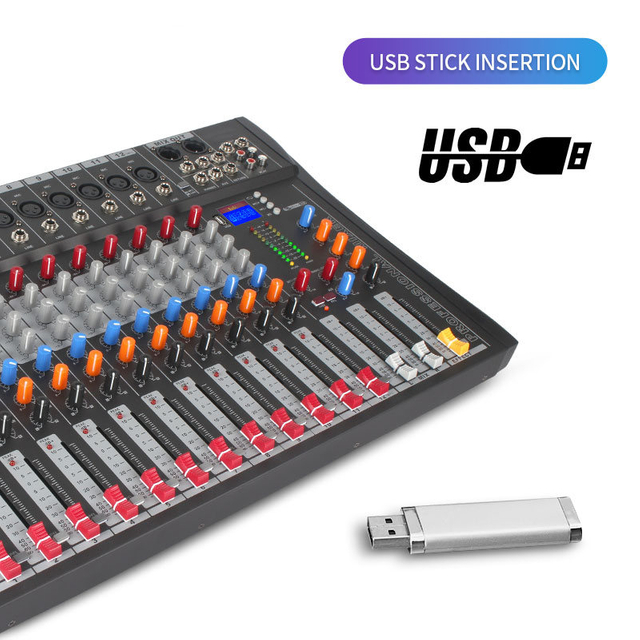
Types of Audio Mixers and Their Use Cases
Analog Mixers: Hands-On Control for Live Sound
Analog mixers offer physical control with tactile faders and dials. Their layout is simple and ideal for quick adjustments during live shows.
Digital Mixers: Precision, Storage, and DSP Capabilities
Digital mixers process sound using software. You get powerful features like scene memory, auto-leveling, and wireless control.
Lihui, a professional audio equipment brand, incorporates advanced DSP technology into its digital mixer line—ideal for theaters and conference centers.
Powered Mixers: Plug-and-Play Convenience for Portable Setups
These mixers have built-in amplifiers. Perfect for smaller gigs or portable PA systems, they reduce the need for separate power amps.
Hybrid Mixers: Combining the Best of Both Worlds
Hybrid units offer analog-style control with digital processing behind the scenes. Ideal for those upgrading from analog but not ready to go fully digital.
Core Components of an Audio Mixer (Channel Strip Breakdown)
Inputs and Preamp Section
Audio mixers accept different types of input: microphone (XLR), instrument (1/4"), and digital (USB). Microphones need preamps to boost weak signals. A GAIN knob adjusts this. When connecting line-level gear like keyboards, use PAD switches to prevent overloading the channel. Always match your connector to the signal type.
Equalizers and Tone Shaping
EQ sections vary: 2-band EQs adjust highs and lows, 3-band EQs add mid control. Advanced mixers offer MID-sweep controls to target vocal ranges or instrument peaks. This flexibility helps tame harsh tones or brighten dull recordings. Shaping sound at the source reduces the need for post-processing.
Faders, PAN, and AUX Sends
Channel faders set individual volumes. The PAN knob moves the signal left or right, creating stereo width. AUX sends let you route a portion of the signal to other devices—like effects processors or monitor speakers. AUX controls are especially helpful in band or multi-speaker setups.
Control Name | Function | Impact on Sound |
GAIN / PAD | Sets input signal strength | Prevents distortion or weak levels |
EQ (2/3-band) | Boost/cut frequencies (high, mid, low) | Adjusts tonal balance |
AUX / FX Send | Sends signal to monitors or effect units | Enables reverb, delay, etc. routing |
Fader / PAN | Controls loudness & stereo positioning | Maintains mix clarity |
Note: Using EQ and PAN smartly keeps mixes spacious and avoids frequency clutter.
Understanding Mixer Buses and Signal Flow
AUX Bus: Monitor Mixes and External Effects
Used for side-chain processing, artist monitors, or applying external reverb/delay units.
GROUP Bus: Control Multiple Channels Together
Group related channels (e.g., drum kit mics) into one bus for unified volume control.
STEREO Bus: Master Output for Main Mix
This is the final stereo signal sent to the audience or recording system.
REC OUT, MONITOR OUT, and PHONES
Use REC OUT to record performances, MONITOR OUT for studio speakers, and PHONES for live monitoring with headphones.
Bus Type | Purpose | Example Use Case |
AUX | Send to monitor or effects | Vocalist headphone mix |
GROUP | Combine channel outputs | All drum mics controlled via one fader |
STEREO | Final mix output | Feed to PA or livestream |
PHONES/REC OUT | Monitor or record | In-studio headphone or DAW capture |
Audio Mixer vs. Audio Interface: What’s the Difference?
Purpose and Performance
Audio mixers shape and blend sound in real time. They’re essential for live audio control. Interfaces, on the other hand, are used to convert analog signals to digital for computers. While some interfaces have basic mixing functions, they lack the physical control and routing options of mixers.
Form Factor and Usage
Mixers are larger, with multiple channels, faders, and output paths. Interfaces are compact, great for solo recording or streaming. If you're podcasting solo, an interface works. But if you're mixing a band or managing multiple speakers, only a mixer gives full control.
Feature | Audio Mixer | Audio Interface |
Sound Shaping | Full EQ, FX, routing per channel | Minimal or software-based EQ |
Real-Time Mixing | Yes | No |
Portability | Larger, more cables | Compact, USB-powered |
Ideal Use Case | Live events, bands, hybrid meetings | Solo recording, podcast, remote work |
Note: Mixers can include USB interfaces. If you stream or record, choose a mixer that doubles as an interface.
How to Choose the Right Audio Mixer for Your Needs
Determining Input Channel Requirements
Start by counting your audio sources. A full band may need 16 or more channels for vocals, drums, and instruments, while solo creators or small teams often work comfortably with 4–6 inputs. Always leave room for future expansion, especially in growing studios or event setups.
Built-in Effects and DSP Needs
Choose mixers with built-in EQ and compression for smoother sound and faster setup. Integrated DSP reduces the need for external processors and simplifies daily operation. For example, Lihui’s powered mixers include studio-grade DSP, trusted by AV teams in schools and corporate venues for stable performance and consistent output quality.
Portability and Power Needs
Powered mixers simplify transport and setup by removing the need for separate amplifiers. Analog mixers suit rugged environments where hands-on control matters. Digital mixers offer flexibility, presets, and remote operation—useful for multi-room venues or repeat events.
USB and Digital Connectivity for Streaming or Home Studios
Need to stream or record directly to a computer? Look for mixers with USB interfaces or digital outputs. These features support quick integration with DAWs, OBS, and conferencing platforms, helping teams move smoothly between live sound and content production.
Key Mixer Features That Affect Audio Quality
Tone Shaping: Parametric vs Basic EQ
Basic EQ setups usually include 2-band or 3-band equalizers—enough for small gigs or general adjustments. But for serious tone control, parametric EQ is the gold standard. It allows you to select the exact frequency to adjust, set the bandwidth (Q), and apply boost or cut with surgical precision. This is critical when trying to control vocal harshness or make space for specific instruments in the mix.
High-Pass Filter: Clean Up the Low End
The HPF is your first line of defense against muddiness. It cuts out unnecessary low-frequency noise like stage rumble, mic handling noise, or air conditioning hum. It’s especially useful for vocals, acoustic guitars, or overhead mics that don’t need deep bass content. Engaging an HPF early in the mix helps keep your sound tight and focused.
Compression: Keeping Levels in Check
Live environments are unpredictable—one second a singer is whispering, the next they’re shouting. Compressors automatically reduce volume spikes, making levels more consistent. This protects your speakers and keeps your audience comfortable. Some mixers include channel-by-channel compression for even more control.
Routing and Group Control
The more AUX sends and group buses a mixer has, the more routing flexibility you get. Want to send custom mixes to each performer? No problem. Want to control all drums with one fader? Easy. Signal routing efficiency matters when you're managing a complex setup and need control without chaos.
Below is a breakdown of how each of these features contributes to pro-level audio control:
Feature | Benefit | Why It Matters |
Parametric EQ | Precise tone control | Reduces harshness or muddiness |
HPF (High-Pass Filter) | Removes rumble, mic pops | Improves vocal clarity |
Compression | Smooths out volume spikes | Prevents speaker damage |
Multiple AUX Sends | Independent monitor mixes | Performer comfort and focus |
Use HPFs on all speech channels to remove low-end interference from HVAC or footsteps.
Use Cases: Who Uses Audio Mixers and Why?
Audio mixers are used across many industries, each with different workflow needs but the same goal—clear, controlled sound. From live music to corporate events, mixers help teams manage multiple sources, apply EQ and effects, and deliver consistent audio. Below is a practical overview of who typically uses an audio mixer and what they rely on it for:
User Group | Primary Use | Typical Audio Needs |
Musicians and Bands | Stage performance and rehearsals | Control multiple mics, instruments, and monitor mixes |
Content Creators & Streamers | Live streaming and content production | Manage mic, music, and game audio simultaneously |
DJs | Live mixing and transitions | Seamless track blending and real-time EQ control |
Event Technicians | Conferences and product launches | Fast setup and consistent sound delivery |
Churches and Conferences | Services, speeches, and multi-zone playback | Mix multiple microphones and playback sources across venues |
Lihui systems are widely used in churches and auditoriums, where stable signal routing and clear sound coverage across all zones are essential for services and large gatherings.
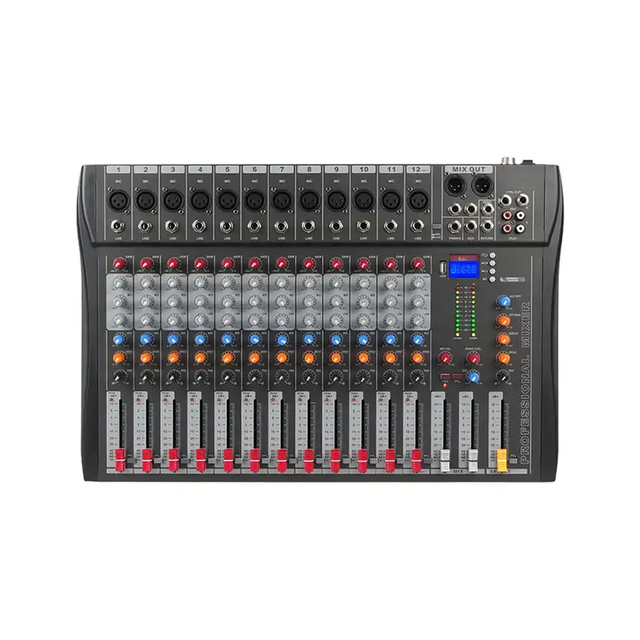
How to Read Mixer Specifications Like a Pro
Understanding specs lets you choose gear that matches your needs without overspending. Below is a guide:
Spec Term | What It Means | Ideal Value |
Headroom | Max volume before distortion | ≥ 20 dB |
Signal-to-Noise Ratio | Audio clarity vs background noise | ≥ 90 dB |
THD (Harmonic Distortion) | Audio purity under processing | ≤ 0.01% |
Input Channels | Total mic/instrument connections | 4–32 depending on application |
Output Buses | Number of available audio paths | 2–8+ for flexibility |
Tip: Choose mixers with both XLR and TRS outputs for compatibility across speakers and recorders.
Conclusion
An audio mixer is more than just equipment—it’s the control hub that brings together multiple sound sources into one cohesive output. It ensures that every microphone, instrument, or playback device is balanced and clearly heard, which is essential for delivering professional-grade sound in any setting. Whether you're producing content, managing live performances, or organizing corporate events, selecting the right audio mixer directly influences the clarity, stability, and overall impact of your audio. It simplifies complex setups, reduces technical issues, and ensures consistent results.
Dongguan Lihui Technology Co., Ltd. offers dependable mixer solutions that combine innovative DSP processing, reliable performance, and user-friendly design. Their products are trusted across theaters, conference venues, and educational spaces—helping teams achieve better control, clearer audio, and greater operational efficiency.
FAQ
Q: What is an audio mixer used for?
A: An audio mixer combines multiple sound sources—like microphones and instruments—into one balanced output. It's essential for live sound, recording, and streaming.
Q: Do I need an audio mixer for a podcast or livestream?
A: Yes. An audio mixer helps manage different audio inputs, apply effects, and control levels, making your podcast or stream sound more professional.
Q: What’s the difference between an audio mixer and an interface?
A: An audio mixer offers real-time sound control and routing. An interface mainly converts analog signals to digital for computers with limited mixing features.
Q: How much does an audio mixer cost?
A: Basic audio mixers start around $100. Professional models with more channels and built-in DSP can range from $300 to over $1,000.
Q: Why is my audio mixer producing distorted sound?
A: This often happens when gain is set too high. Try reducing input levels, using a PAD switch, or checking for signal clipping.
Q: How does an audio mixer improve sound quality?
A: An audio mixer enhances clarity by adjusting EQ, applying compression, and balancing input levels—resulting in a cleaner, more consistent sound.


 +86-18822957988
  rick@lihuitech.com
  +86-13925512558
  Hengbang Technology Park Lihui Technology Co., Ltd., No. 8 Weiheng Road, Niushan Industrial Zone, Dongguan City