Introduction
In any environment where sound quality matters—live concerts, podcast studios, school auditoriums, or business conferences—the audio mixer plays a critical role. It acts as the central hub that blends multiple audio sources, balances levels, shapes tone, and routes signals to the right destination. Without it, even the best microphones or speakers can’t perform at their full potential. Whether you're producing a music session, managing a live broadcast, or handling classroom AV, understanding what an audio mixer is used for gives you the power to control sound with confidence.
In this article, we’ll explore the functions, applications, and practical value of audio mixers, and explain why trusted brands like Lihui have become essential in delivering consistent, high-quality sound across professional environments.
Understanding the Role of an Audio Mixer
What an Audio Mixer Actually Does
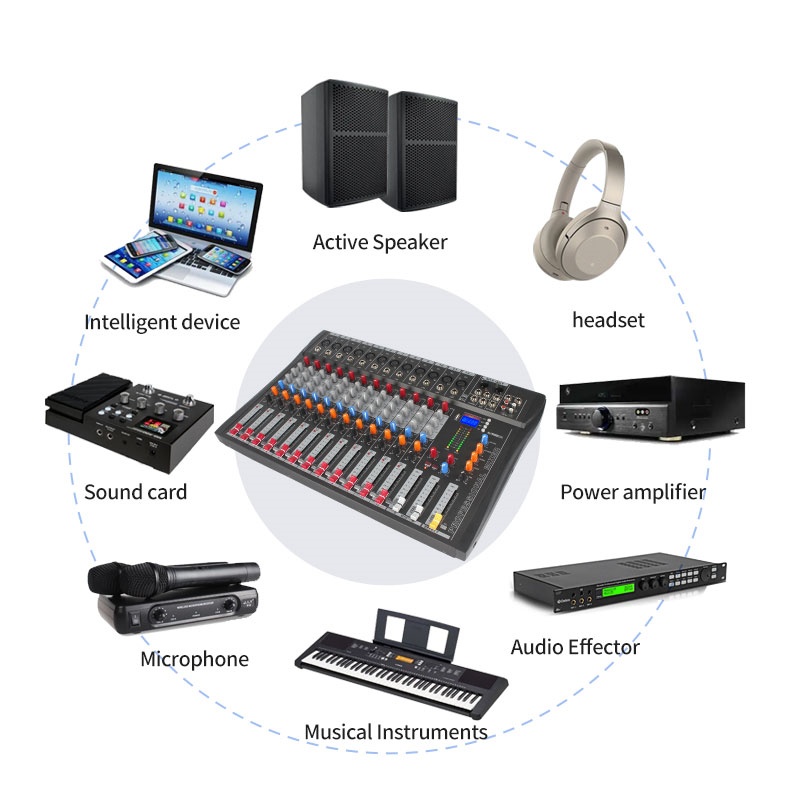
An audio mixer takes several input signals—microphones, instruments, or media devices—and combines them into one or more output streams. It lets you control which signal is louder, sharper, or more prominent in a final mix.
You can think of it like a chef blending ingredients: each channel (input) is a flavor, and the mixer decides the final taste.
How Signal Routing and Mixing Works
Mixers offer multiple routes to send sound. For instance:
● To main speakers for audiences.
● To monitors for performers.
● To recorders for saving clean audio.
Routing options like AUX sends and group buses give engineers flexibility to manage sound in real-time.
The Building Blocks: Channels, EQs, Effects, and Faders
No matter the size or complexity of the setup, most audio mixers share a set of essential components. These core elements give users control over every detail of the sound—from volume and tone to spatial positioning and added effects. Understanding how each part works helps users shape cleaner, more professional audio with confidence.
Here’s a quick breakdown of the main building blocks found on most audio mixers:
Component | Function |
Channels | Each sound source—like a mic or instrument—gets its own input channel. |
EQ | Adjusts tonal balance (bass, midrange, treble) to clean or enhance sound. |
Faders | Control the output level (volume) of each individual channel. |
Pan Knobs | Place sound in the stereo field: left, right, or center. |
Effects | Add enhancements like reverb, delay, or compression for depth and polish. |
These controls form the foundation of every mixing workflow, from small podcast setups to full-scale concert stages.
Why Audio Mixers Are a Core Tool in Sound Engineering
Without a mixer, sound sources would clash or overpower one another. Audio mixers create clarity, balance, and cohesion. In environments like conferences or theaters, they’re essential for audience understanding and experience.
Tip: Even a small 4-channel mixer can dramatically improve clarity in hybrid meetings or webinars.
Key Applications of an Audio Mixer
Live Sound Mixing
At concerts, mixers balance vocals, guitars, drums, and effects. Engineers adjust levels in real time to prevent feedback and ensure the audience hears everything clearly.
Large-scale live mixers may manage 32+ channels, offering multiple output mixes—like front-of-house and on-stage monitors.
In live scenarios, using group buses helps adjust multiple mic levels with one slider.
Studio Recording
In music studios, mixers let engineers craft multi-track sessions. Each instrument is recorded on a separate channel. EQ and dynamics processing help produce a polished, professional sound.
This is where mixers with USB multitrack output become crucial.
Podcasting and Broadcasting
Podcasters use audio mixers to:
● Balance multiple guest microphones.
● Insert intro/outro music.
● Apply noise filters and EQ to voices.
Broadcast studios require clean, stable audio routing across different output paths: streaming platforms, live radio, and recordings.
Mixers with mute buttons and aux sends simplify live podcasting and radio shows.
Video and Film Production
In filmmaking, mixers manage audio from:
● Lavalier microphones (actors).
● Boom mics (ambient/environmental sound).
● Playback tracks (music, voiceover).
Proper mixing ensures cleaner post-production edits and sync.
Educational and Institutional Use
Lecture halls and training centers use mixers to:
● Amplify speakers or teachers.
● Play multimedia audio.
● Manage multiple microphones in events.
Application Area | Primary Function |
Live Sound | Real-time multi-source mix |
Studio Recording | Multi-track audio shaping |
Podcast/Broadcast | Voice clarity and routing |
Video Production | Sync ambient/dialogue audio |
Education/Institution | Amplify and zone management |
Lihui’s integrated audio systems, already deployed in schools and exhibition halls, simplify setup for AV teams.
A mixer with multiple AUX outputs helps create different listening zones—ideal for classrooms or interpreter systems.
Types of Audio Mixers and Their Advantages
Mixer Type | Best For | Key Benefit |
Analog | Small venues | Simple controls |
Digital | Medium–large setups | Saved presets |
Powered | Mobile events | Fewer components |
Software-Based | Studio/streaming | Visual interface |
Analog Mixers: Hands-On Simplicity
Analog mixers offer physical knobs and faders. They’re intuitive and reliable. Ideal for small venues, they provide immediate visual feedback.
● Great for beginners.
● No software updates required.
Digital Mixers: Powerful and Configurable
Digital mixers use signal processors to control sound. They often include:
● Built-in effects.
● Scene recalls.
● Multiband EQs and compressors.
They suit medium to large venues, especially where presets are reused often. Use scene memory in digital mixers to save configurations for recurring events.
Powered Mixers: Compact All-in-One Units
Powered mixers include built-in amplifiers. This reduces gear needed for portable PA systems.
Lihui’s powered mixers, with studio-grade DSP, are popular in schools, theaters, and mobile setups. Powered mixers are ideal for event companies needing fast deployment and fewer cables.
Software-Based Mixers: Ideal for DAW Production
DAWs (Digital Audio Workstations) offer virtual mixing environments. They're used by:
● Music producers.
● Sound designers.
● Streamers and podcasters.
Software mixers give more visual tools but rely on computer power.
Inside an Audio Mixer: What Each Section Does
A mixer’s surface may look complex, but most sections follow a logical layout. Each control serves a specific purpose in shaping and managing sound. Understanding these sections is key to building clean, professional mixes—whether you're in a studio or on stage.
The table below breaks down the core components found on most audio mixers and their primary functions:
Component | Function |
Input Channels | Connect microphones, instruments, or media playback sources |
Gain Control | Sets input signal strength to prevent distortion or noise |
EQ Section | Adjusts frequency balance for clarity and tone |
Faders | Controls volume output for each channel |
Aux Sends | Routes signals to stage monitors or external effects units |
Pan | Positions sound across left, center, and right fields |
Groups | Combines multiple channels for unified volume control |
Tip: Always start with proper gain staging—it’s the foundation for clean, noise-free audio.
How Audio Mixers Improve Sound Quality
Gain Balancing and Headroom Optimization
Every audio signal enters the mixer at its own strength. Some are too weak, others too loud. Without proper gain structure, distortion creeps in or subtle sounds get lost.
A well-set gain keeps signals clean and within “headroom” limits. This avoids clipping during loud passages and reduces hiss during quiet ones. Balanced gain also ensures that EQ, effects, and dynamics processors work effectively. If gain is too high, even the best EQ can’t save a distorted voice.
Precision Tone Control with EQ
Equalization (EQ) is your tone sculptor. It allows you to raise or cut specific frequency bands—typically lows, mids, and highs. Got a muffled voice? Boost the upper mids. Too much boom from a mic? Cut the low end. Harsh 'S' sounds? Use the high shelf with care.Whether it's a vocal, a guitar, or a pre-recorded track, EQ helps everything sit better in the mix without fighting for space.
Compression for Smoothness and Consistency
Live sound often jumps between whispers and shouts. Compression solves this by narrowing the volume gap between soft and loud sounds. With compression, voices don’t disappear when someone leans away from the mic. Loud peaks get tamed, and quieter passages become more present. The result? A smoother, more professional mix that requires less manual fader riding.
Apply compression sparingly on live vocals—too much will flatten dynamics and feel unnatural.
Adding Dimension with Reverb and Panning
Flat mixes feel unnatural. Audio mixers help create depth by simulating real space.
Reverb mimics the way sound behaves in a room—adding subtle echoes that give vocals or instruments a “place.” Just a touch of reverb makes speech feel more lifelike and less dry, especially in large halls.
Panning controls where a sound sits in the stereo field—left, right, or center. Spread your instruments across the mix and you’ll avoid clutter while offering listeners a spacious, immersive experience.
Mixer Feature | Impact on Audio |
EQ | Enhances clarity, removes noise or mud |
Compression | Levels out volume fluctuations |
Reverb | Adds realistic ambiance and depth |
Pan | Creates width and spatial separation |
Panning isn’t just for music—placing voices across channels improves intelligibility during multi-speaker presentations.
Audio Mixer vs Audio Interface: Which Do You Need?
When setting up a sound system, many professionals ask: should I use an audio mixer or an audio interface? The answer depends on your workflow. While both devices handle audio signals, their roles differ in key ways—especially between live sound and digital recording.
Here’s a simple comparison to help you decide which fits your needs best:
Feature | Audio Mixer | Audio Interface |
Purpose | Real-time mixing and routing | Recording and playback via computer |
Number of Inputs | Often many | Typically fewer |
Effects | Built-in (some models) | Mostly dry signal |
Output Routing | Complex: AUX, GROUP, MONITOR, etc. | Basic: stereo out |
Live Suitability | Excellent | Limited |
Use both together—record with an interface, monitor live with a mixer. Lihui’s USB-enabled mixers provide the best of both worlds for hybrid production setups.
Choosing the Right Audio Mixer
Match Mixer Type to Application
Choosing the right mixer starts with understanding where and how you plan to use it. Different applications demand different mixer types, whether you’re working on mobile events, in a studio, or running live streams. Matching the mixer to the job helps simplify setup and improves overall sound control.
Here’s a quick reference to guide your selection:
Application | Recommended Mixer Type |
Portable gigs | Powered mixers |
Studio setups | Analog or digital mixers with USB |
Streaming | Software mixers or hybrid units |
Brand Considerations
Choose brands with:
● CE/FCC/RoHS certifications.
● Proven build quality.
● Reliable service and parts.
A brand like Lihui, with a 20-year R&D track and global presence, offers confidence in both function and service.
Practical Mixing Workflow: How It's Done
1. Connect all sources: mics, instruments, playback devices.
2. Set gain for each channel: adjust until the signal peaks around -6 dB.
3. Use EQ to shape tone: reduce muddiness, add clarity.
4. Pan channels for a wide stereo image.
5. Send signals to monitors via AUX sends.
6. Add effects like reverb or delay.
7. Adjust main fader for output volume.
8. Test and finalize the mix.
Tip: Always use headphones to double-check your final mix before broadcasting or recording.
Conclusion
An audio mixer stands at the center of professional sound, shaping clarity in concerts, classrooms, studios, and broadcasts. When you master an audio mixer, podcasts sound richer, live shows feel stronger, and workflows become easier.
Dongguan Lihui Technology Co., Ltd. delivers durable, feature-rich mixers that support stable mixing, flexible routing, and reliable daily operation. Choose the right mixer, match it to your needs, and let every project sound confident and complete.
FAQ
Q: What is an audio mixer used for?
A: An audio mixer is used to combine, balance, and control multiple sound sources, such as microphones and instruments, for live events, recordings, or broadcasts.
Q: How does an audio mixer improve sound quality?
A: An audio mixer improves sound by adjusting tone with EQ, controlling volume levels, and adding effects like reverb and compression.
Q: Do I need an audio mixer for podcasting?
A: Yes, using an audio mixer helps you manage multiple mics, remove background noise, and produce a more professional-sounding podcast.
Q: What’s the difference between an audio mixer and an audio interface?
A: An audio mixer controls live sound in real time, while an audio interface mainly converts audio for recording and playback on a computer.
Q: How many channels should my audio mixer have?
A: It depends on your needs. A solo podcaster might need 2–4 channels, while a live band may require 16 or more.
Q: Why choose Dongguan Lihui Technology Co., Ltd. products?
A: Lihui offers durable audio mixers with built-in DSP, trusted in schools, venues, and studios for their sound quality and reliable performance.


 +86-18822957988
  rick@lihuitech.com
  +86-13925512558
  Hengbang Technology Park Lihui Technology Co., Ltd., No. 8 Weiheng Road, Niushan Industrial Zone, Dongguan City